
No-code chatbot for instant customer engagement
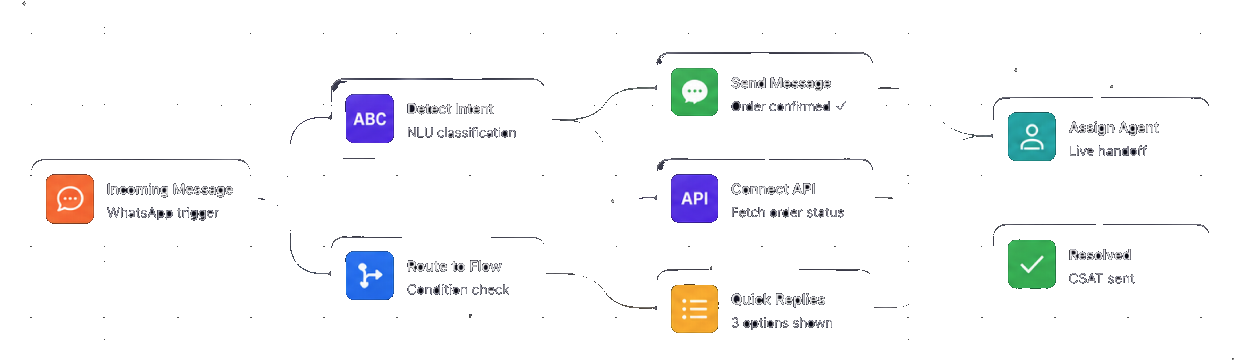
Build AI-powered WhatsApp chatbots in minutes — no coding required. Automate lead qualification, support, and 24/7 responses on the platform your customers already prefer.
- 2 min To launch your first bot
- 24/7 Always-on responses
- No-code Visual flow builder
- AI GPT-powered replies
Everything you need to build and run a chatbot
A no-code builder, real AI, WhatsApp delivery and a clean handoff to humans — from your first flow to millions of conversations.
-
Visual flow builder
Drag, drop and connect blocks to design conversations — triggers, conditions, replies and actions — with zero code.
-
AI intent detection
Built-in NLU reads what customers actually mean, classifies intent and routes each message to the right path automatically.
-
WhatsApp-native
Your bot lives on the channel customers already use, with verified branding, rich templates and a 24-hour conversation window.
-
Live-agent handoff
When a conversation needs a human, the bot escalates to your shared inbox with full context — no dropped threads.
-
API & integrations
Call your own APIs mid-flow to fetch an order status or check a balance, and push every lead straight into your CRM.
-
Quick replies & buttons
Guide customers with tappable buttons and list menus so they reach an answer in one tap instead of typing.
-
24/7 automation
Answer the moment a message arrives — any hour, any volume — so no lead or question ever waits for business hours.
-
Conversation analytics
See where chats convert or drop off, track resolution and CSAT, and refine flows from one clear dashboard.
One bot, every conversation
Put the repetitive work on autopilot so your team spends its time on the conversations that actually need a person.
-
Lead qualification
Greet every new enquiry, ask the right questions, and pass hot, pre-qualified leads to sales while they’re still warm.
-
Support & FAQs
Resolve the repetitive questions instantly and round the clock, and hand the tricky ones to an agent with full context.
-
Order updates
Confirm orders, share tracking and answer “where’s my order?” automatically by calling your systems inside the chat.
A chatbot that fits how your business talks to customers
Whatever you sell or support, a no-code WhatsApp bot turns every message into an instant, on-brand conversation.
-
E-commerce & Retail
Recover carts, recommend products and handle order queries in chat, escalating to a human only when it’s worth it.
-
Banking & Finance
Answer balance and statement questions securely, verify identity, and route sensitive requests to the right team.
-
Healthcare
Book, confirm and reschedule appointments and triage common questions without tying up front-desk staff.
-
Travel & Hospitality
Take bookings, share itineraries and handle check-in or changes in a single WhatsApp thread, day or night.
-
Education
Answer admissions and fee questions, capture enquiries and guide applicants through each step automatically.
-
Real Estate
Qualify buyers, share listings and book site visits instantly, so no lead goes cold waiting for a reply.

Launch a working WhatsApp chatbot in two minutes
Start from a template, drop in your welcome message, intents and replies, and connect a WhatsApp number — no developers required. Within minutes a bot is greeting customers, qualifying leads and answering FAQs around the clock, handing off to a live agent the moment a conversation needs one.
first chatbot
Build your first WhatsApp chatbot in 2 minutes
- 1 Pick a template or start from scratch
- 2 Design the flow with drag-and-drop blocks
- 3 Add AI replies and quick-reply buttons
- 4 Connect your WhatsApp number
- 5 Publish and watch conversations roll in
Chatbots, answered
Do I need to know how to code to build a chatbot?
No. The visual flow builder is fully no-code — you design conversations by dragging and connecting blocks. Developers can still call custom APIs and webhooks when they want to, but it isn’t required.
Which channel does the chatbot run on?
Primarily the WhatsApp Business API — the channel most customers already prefer — with the same bot logic available across Telinfy’s other channels. It uses verified branding and rich, tappable replies.
Can the bot understand free-text questions?
Yes. Built-in NLU classifies intent from what customers actually type, so the bot routes each message to the right path instead of forcing rigid keyword matches.
How does handoff to a human agent work?
When a flow hits a point that needs a person, the conversation escalates into your shared team inbox with the full chat history attached, so an agent picks up exactly where the bot left off.
Can the chatbot connect to my own systems?
Yes. You can call your APIs mid-conversation to fetch an order status, check a balance or create a record, and push captured leads straight into your CRM.
Will it really answer customers 24/7?
Yes — the bot replies the instant a message arrives, at any hour and any volume, so customers never wait for business hours for a first response.
Can I see how my chatbot is performing?
Absolutely. A dashboard shows conversations, resolution rate, where people drop off and CSAT, so you can refine your flows over time.